> For the complete documentation index, see [llms.txt](https://help.roolz.net/llms.txt). Markdown versions of documentation pages are available by appending `.md` to page URLs; this page is available as [Markdown](https://help.roolz.net/en/auction-bidding-mode/planned-price-feature.md).
# "Planned price" feature
#### What does this mean?
This functionality is primarily intended for companies where bonus calculations for logistics specialists and managers are based on a comparison of planned and actual transportation costs.
#### Why is the "Planned price" feature needed?
For many large companies it's important to record the expected cost of a shipment at the offer publishing stage in addition to the initial auction price field.
In practice, the planned price most often includes:
* the historical price for similar shipments;
* the target budget allocated for a specific route or flight;
* the internal planned rate used for calculating KPIs and employee bonuses.
In conjunction with the actual cost of closing a shipment, this allows:
* to calculate "planned/actual" indicators;
* to use data in Excel, CSV and JSON exports;
* to accurately determine employee bonus amounts;
* to increase the transparency and manageability of logistics processes.
{% hint style="danger" %}
**Important!** The "Planned price" feature is only available by default for companies on paid plans: Pro, Expert, and Enterprise. It is not available for individuals or other plans.
{% endhint %}
#### Where can I find and enable the "Planned price" feature?
To enable the "Planned price" setting in Auction mode:
{% stepper %}
{% step %}
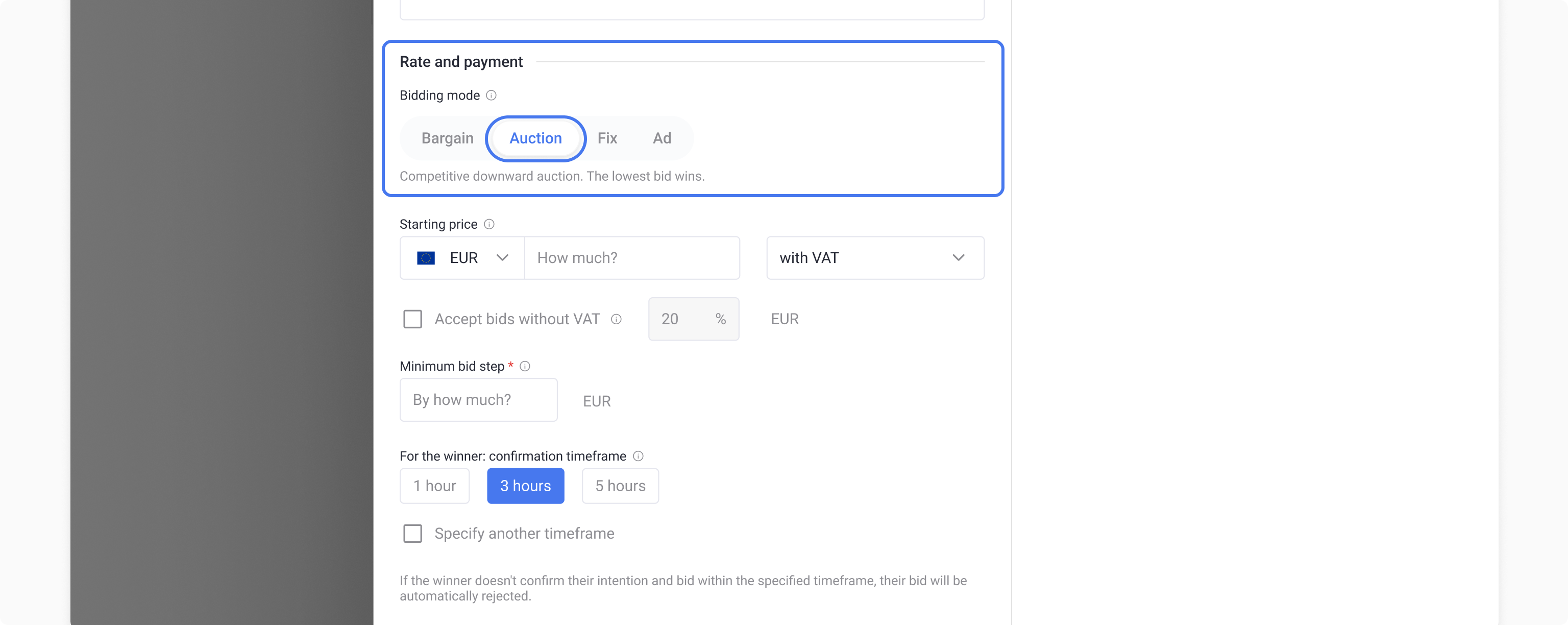
When creating an offer fill in all the required fields and select "Auction" mode in the "Rate and payment" section.
{% endstep %}
{% step %}
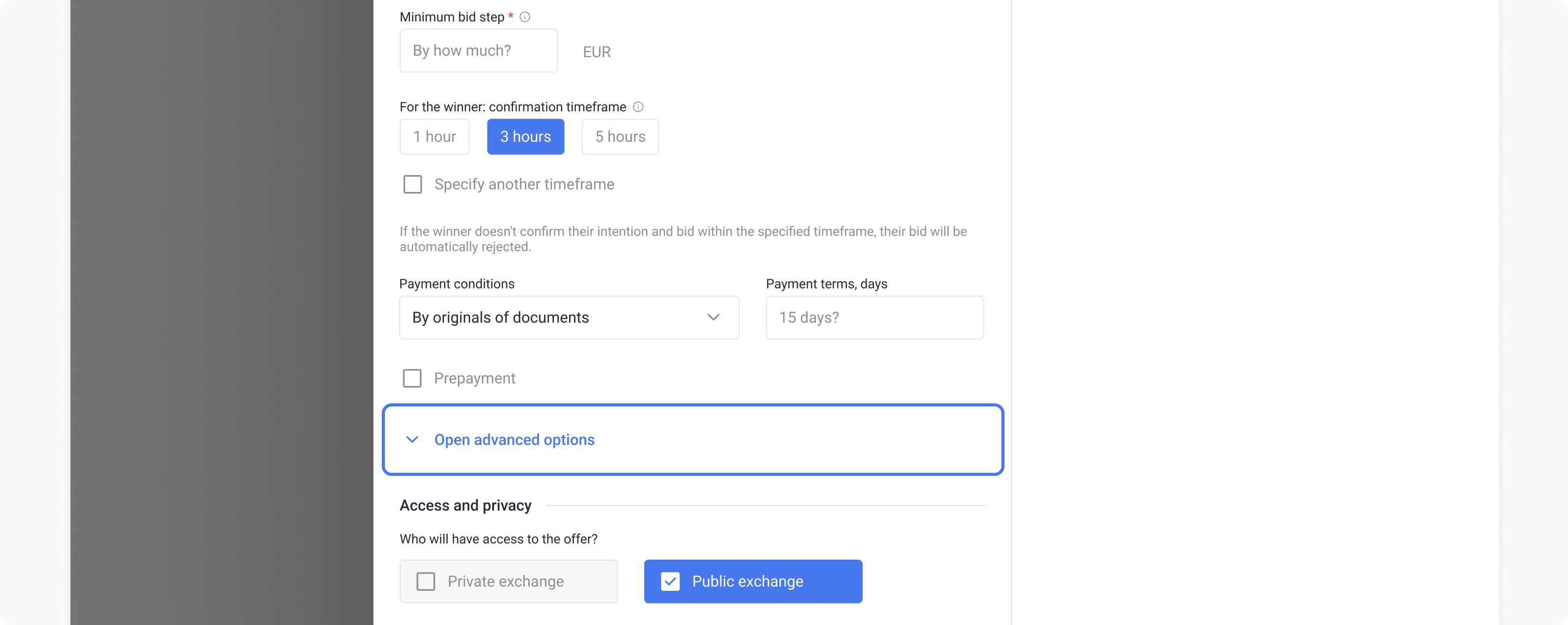
Click "Open advanced options" to display additional checkboxes available with your plan.
{% endstep %}
{% step %}
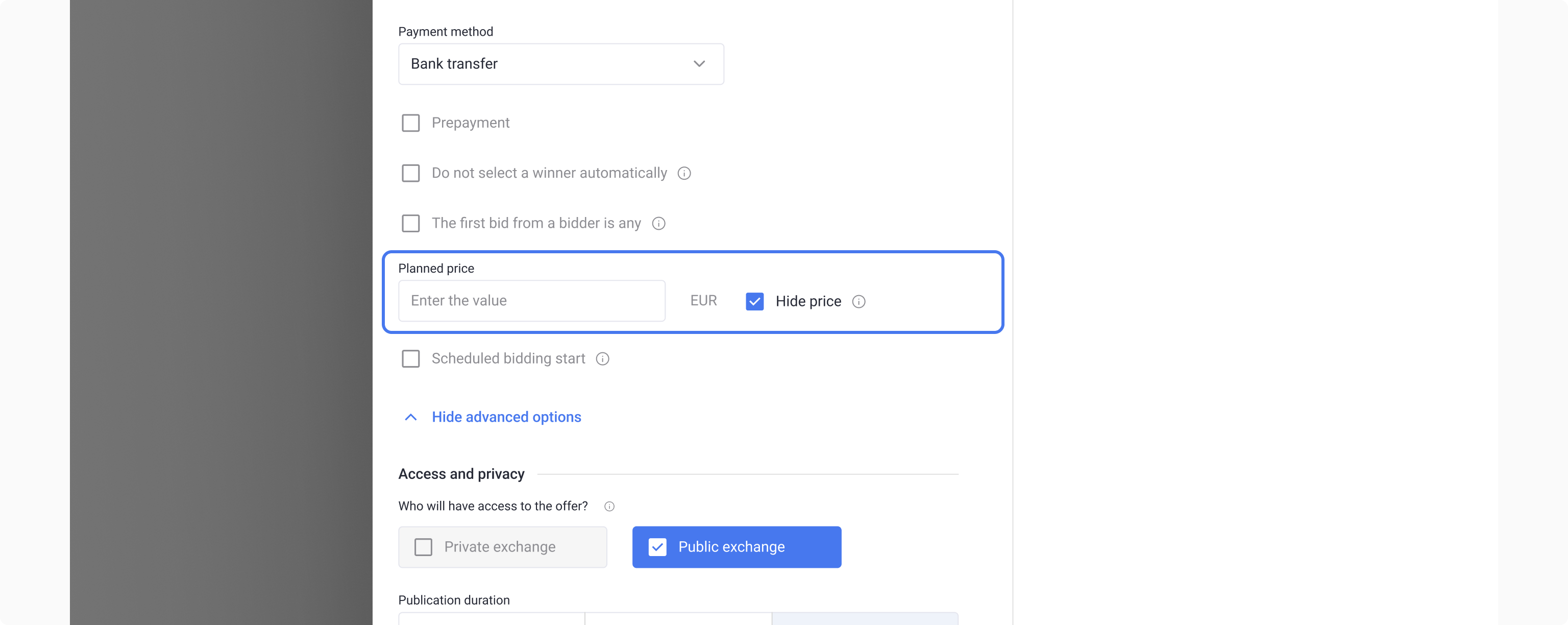
Activate the "Planned price" setting and select "Hide price" option if necessary.
{% endstep %}
{% step %}
Fill in the remaining details and publish the offer.
{% hint style="danger" %}
**Important!**
* The planned price currency always matches the offer currency.
* The tax type for the planned price is not applied.
"Planned price" is only available for viewing when the offer is fully disclosed and the privacy setting is disabled.
{% endhint %}
{% endstep %}
{% endstepper %}
#### Setting the planned price privacy: "Hide price"
If privacy is enabled:
* The planned price is visible only to you and your colleagues within the company.
* Bidders do not see or receive the field value either in the interface or through the API.
If privacy is disabled:
* The planned price may be available to auction participants, depending on the bid acceptance settings.
If "The first bid from a bidder is any" setting is enabled in the auction:
* if privacy is disabled, the bidder will see the planned price only after their first bid;
* if privacy is enabled, they will not see it under any circumstances.
#### Templates, Duplicates and Rates
* When creating an offer template, the field's state and privacy settings are saved.
* When duplicating an offer, the field's privacy settings are also saved if the company has access to the feature.
If a company loses access to the feature (for example, switching from Pro to Starter plan):
* the field remains unchanged in existing offers;
* the field is unavailable in new offers;
* when applying a template or creating a duplicate, the field values are ignored.
When switching to a plan that supports the feature, the planned price also becomes available in existing offers.
---
# Agent Instructions
This documentation is published with GitBook. GitBook is the documentation platform designed so that both humans and AI agents can read, navigate, and reason over technical content effectively. Learn more at gitbook.com.
## Querying This Documentation
If you need additional information that is not directly available in this page, you can query the documentation dynamically by asking a question.
Perform an HTTP GET request on the current page URL with the `ask` query parameter, and the optional `goal` query parameter:
```
GET https://help.roolz.net/en/auction-bidding-mode/planned-price-feature.md?ask=&goal=
```
`ask` is the immediate question: it should be specific, self-contained, and written in natural language.
`goal` is optional and describes the broader end goal you are ultimately trying to accomplish on behalf of the user. GitBook uses it to tailor the answer towards what is most useful for that goal.
The response will contain a direct answer to the question and relevant excerpts and sources from the documentation.
Use this mechanism when the answer is not explicitly present in the current page, you need clarification or additional context, or you want to retrieve related documentation sections.