> For the complete documentation index, see [llms.txt](https://help.roolz.net/llms.txt). Markdown versions of documentation pages are available by appending `.md` to page URLs; this page is available as [Markdown](https://help.roolz.net/en/getting-started/quickstart.md).
# What is Roolz?
Roolz is a digital B2B platform for organizing freight transportation and purchasing transportation services. It helps businesses find service providers, work with their own partner pool, conduct online bids and manage transportation processes within a single digital environment.
The platform is designed for cargo owners, carriers, forwarders, dispatchers and other participants in the logistics chain, providing convenient interaction between all parties.
**Transportation coverage:** Europe, the CIS and Asia, including China.
**Multilingual platform:** Roolz is available in 10 languages, including Russian, English, German, French, Chinese and others, making it convenient for users in different markets.
## Roolz key opportunities
### 🚛 Freight transportation organization and partner search
* **Public and private exchanges**
A **public exchange** is designed for the open and spot market, with cargo owners posting requests and carriers and forwarders submitting their rates and terms. Users gain access to a wide range of available cargo and transport offers based on routes, vehicle types and transportation requirements.
A private exchange is designed for working with a company’s own pool of verified carriers and forwarders. It is suitable for contract logistics and enables companies to purchase transportation services within a closed network without involving third-party participants. Such an exchange saves time when searching for counterparties, helps maintain control over the partner pool and supports more secure cooperation.
Learn more about the difference between private and public exchanges 👉[ Public vs private exchange: the difference](https://help.roolz.net/en/exchange-and-offers-freight-and-transport-market/public-vs-private-exchange-the-difference)
* **Multimodal transportation**
Users can arrange freight transportation using one or more modes of transport, including road, rail, sea and air, within a single order and route.
Learn how to work with multimodal transportation here:[ Multimodal transportation: how to create an offer](https://help.roolz.net/en/multimodal-transportation-how-to-create-an-offer)
* **Automatic matching of cargo and transport offers**
The system automatically matches suitable cargo and transport offers on the public exchange based on specified parameters, helping logistics professionals find relevant offers faster and reduce the time spent searching.
* **Email notifications**
Users receive timely notifications about new offers, offer statuses and other important events. This allows them to respond quickly to relevant transportation opportunities and avoid missing important offers.
### 📊 Online bidding and transportation procurement
* **Online bidding: 4 bidding modes**
Roolz offers four bidding modes: **Bargain**, **Auction**, **Fix** and **Ad**. They allow users to choose the most suitable format for each transportation procurement task and set of requirements.
Each mode includes additional functionality for flexible configuration and management of the bidding process.
Online bidding is available on both public and private Roolz exchanges.
Learn more about each mode, its features and available functionality in the[ Bids section](https://help.roolz.net/en/bargain-bidding-mode).
* **Scheduled bidding start feature**
The feature allows shippers to publish offers in advance and set exact start and end times for bid acceptance. Carriers and forwarders can review the transportation requirements beforehand and prepare their offers, while bid acceptance automatically opens and closes at the scheduled times.
The feature simplifies planning and makes the bidding process more transparent and predictable.
See the setup instructions and operational details here:[ Scheduled bidding start feature](https://help.roolz.net/en/scheduled-bidding-start-feature)
* **Partner selection mode**
The mode allows users not only to receive and compare bids but also to expand their partner pool.
A shipper can duplicate a private offer on the public exchange, attract new participants and add suitable service providers to their private pool based on the results of the cooperation.
Participating carriers and forwarders have an opportunity to present themselves to potential clients and establish long-term partnerships, moving to a private cooperation format.
See more details about Partner selection mode in the[ Roolz database](https://help.roolz.net/en/partners-selection-mode).
### 🤝 Partnership and communication
* **Partner groups**
Partner groups allow users to organize partners on the private exchange according to specified criteria, such as reliability, vehicle type, geography or payment terms.
This allows counterparties to send offers to the right users with one click and quickly invite them to participate in online bids.
Find more information about the available capabilities and setup in[ Partner groups](https://help.roolz.net/en/partner-groups).
* **Business messenger**
A tool for fast communication between partners, colleagues, drivers and other stakeholders. It enables real-time information exchange within a single space.
* **Roolz company directory**
The company directory allows users to present their company, services and competitive advantages in a dedicated profile. It also helps users find new partners and contact company representatives and decision-makers.
A company profile on the platform can serve as a mini version of a company website, bringing key information about services, competitive advantages and contact details together in one place.
Learn more about directory capabilities in[ Company directory](https://help.roolz.net/en/company-directory/all-you-need-to-know).
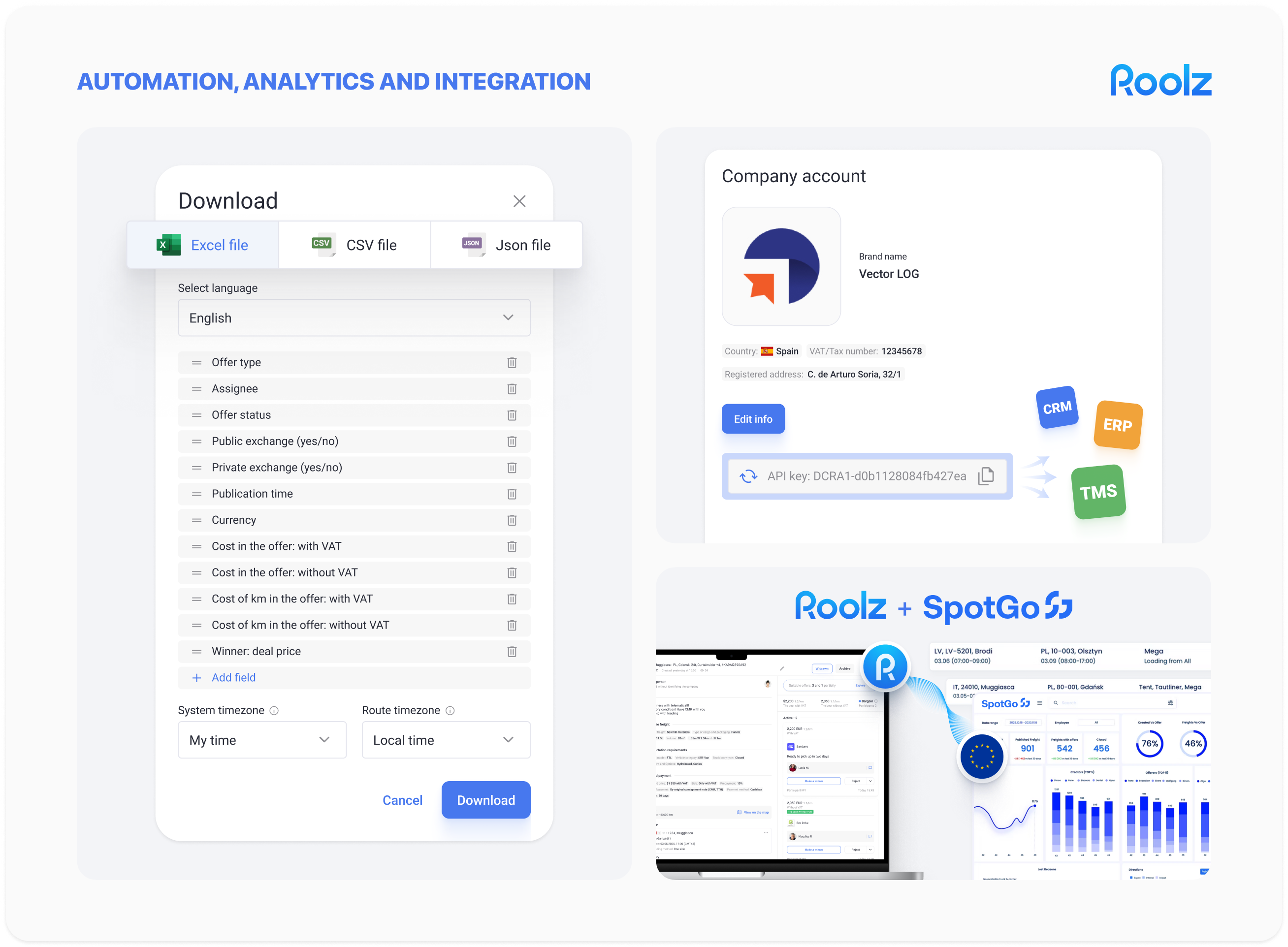
### ⚙️ Automation, analytics and integration
* **Integration with CRM, TMS and ERP systems**
The platform allows users to collect and analyze data on offers, tenders and transactions in convenient formats. Data exports help accelerate reporting, analytics and further information processing in the business systems used by the company.
You can use filters and prepare offers for export in[ Offers: managing and exporting to EXCEL, CSV, JSON](https://help.roolz.net/en/offers-managing-and-exporting-to-excel-csv-json).
* **Public API and integrations with other systems and platforms**
Roolz integrates with corporate CRM, TMS, ERP and WMS systems, enabling companies to incorporate transportation management into their existing business processes without changing their established IT infrastructure.
The platform can also integrate with other digital solutions, such as SpotGo, allowing shippers to access carriers and forwarders from Europe, the CIS and China and expand their opportunities to find and interact with partners in different markets.
Learn more about API capabilities and getting started with integration in[ OPEN API](https://help.roolz.net/en/open-api/introduction).
For integration-related questions, please contact us at .
### 📚Freight transportation and logistics expert blog
We publish industry news, analyze important developments and share practical information about transportation and logistics.
Roolz brings together experts and market participants to make complex logistics processes clearer and more accessible.
👉[ Read expert articles on the Roolz blog](https://roolz.net/ru/info/)
## Everything for transportation management in a single digital space
Roolz combines freight search and transportation procurement, cooperation with existing and new partners, online bidding, offer management, communication, analytics and integration with corporate systems.
This helps reduce the number of separate tools used for transportation management and makes logistics processes more transparent. As a result, companies can manage transportation more efficiently within a single digital platform.
---
# Agent Instructions
This documentation is published with GitBook. GitBook is the documentation platform designed so that both humans and AI agents can read, navigate, and reason over technical content effectively. Learn more at gitbook.com.
## Querying This Documentation
If you need additional information that is not directly available in this page, you can query the documentation by asking a question.
Perform an HTTP GET request on the following URL with the `ask` and `goal` query parameters:
```
GET https://help.roolz.net/en/getting-started/quickstart.md?ask=&goal=
```
`ask` is the immediate question: it should be specific, self-contained, and written in natural language.
`goal` is what the user is ultimately trying to achieve, the reason they need the answer. Sharing it helps GitBook give you a better, more relevant answer. A goal is most helpful when it describes the outcome the user wants rather than restating the question. For example, with `ask=how do I create an API token`, a goal like `automate deployments from our CI pipeline` lets GitBook tailor the answer to that use case.
The response will contain a direct answer to the question and relevant excerpts and sources from the documentation.
Use this mechanism when the answer is not explicitly present in the current page, you need clarification or additional context, or you want to retrieve related documentation sections.